
The Security and Bug Gate: Two-Tier Code Review for AI
The Security & Bug Gate: Two-Tier Code Review for AI
AI can ship features fast, but it can also ship vulnerabilities. Here's the quality firewall I built after almost leaking customer data in production.
It was 3 AM, Slack was lighting up, and my “perfectly safe” AI code was one missed clause away from exposing customer data.
OK, that didn't actually happen. But it almost did.
Three months ago, I was feeling pretty good about our AI workflow. Claude was generating clean Supabase RLS policies, our features were shipping fast, and everything looked perfect in development. We pushed a new user management feature to staging and called it a day.
Two days later, during what was supposed to be a routine security audit, we discovered something that made my stomach drop: our AI-generated RLS policy had a subtle but critical flaw. Users could read data from anyorganization they'd ever been a member of, including ones they'd been removed from.
The policy checked organization_members but didn't verify the membership was still active. One missingAND status = 'active' clause away from a major data leak.
"AI is optimized for helpfulness and plausibility, not correctness or security. It'll generate code that seems right, compiles, and passes surface-level tests, but fails confidently in ways that are hard to spot."
This wasn't a fluke. I've made every AI code generation mistake in the book. I've shipped authentication checks that looked perfect but had holes. I've written database queries that worked great for happy paths but leaked data on edge cases. I've skipped input validation because "it's just a quick script" (narrator: it wasn't).
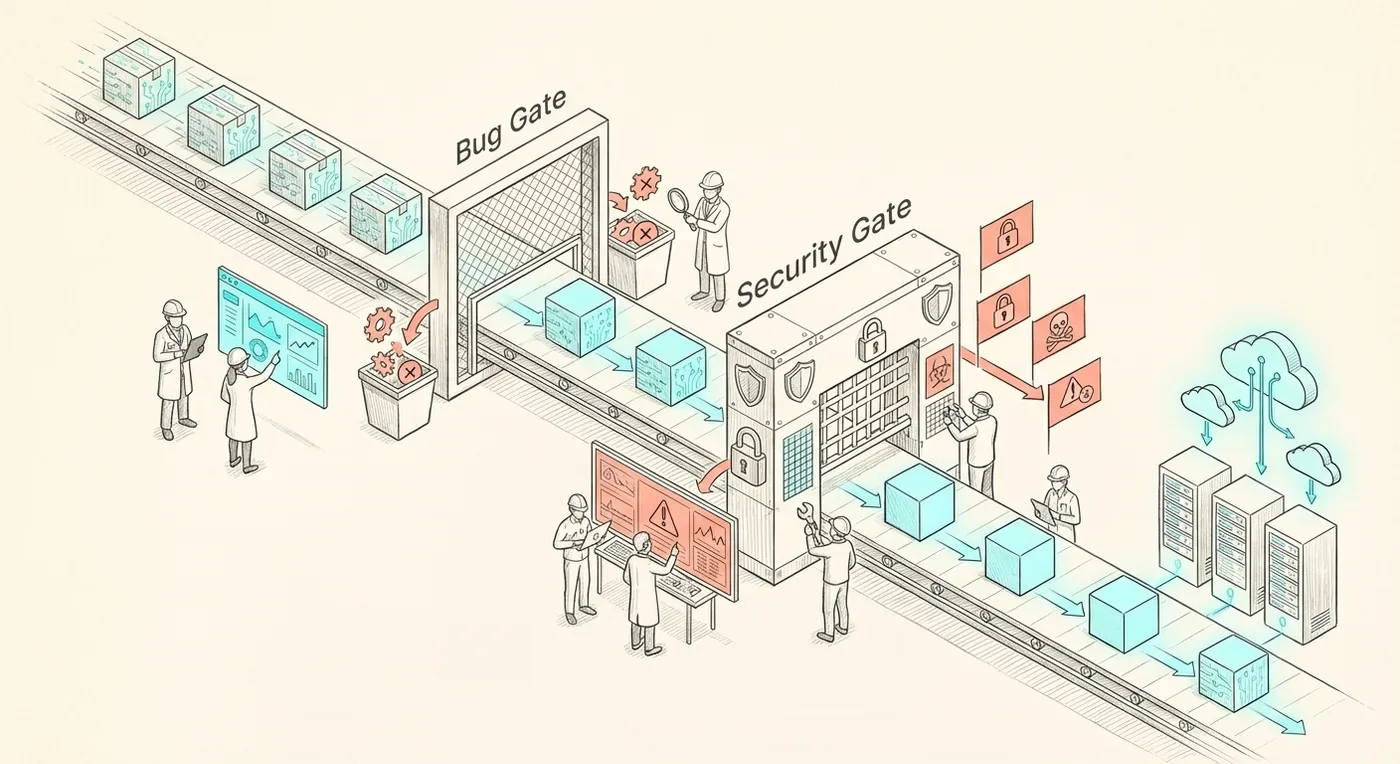
That near-miss forced me to completely rethink how we handle AI-generated code. The result? The Security & Bug Gate: a two-tier code review system that treats all AI-generated code as unsafe until proven otherwise.
Since then, it's saved us from at least a dozen production incidents. Here's exactly how it works.
The Core Insight: Default to Distrust
The mental shift we had to make was simple but profound:
Old mindset: "This AI code looks good, let's ship it."
New mindset: "This AI code is unsafe until it passes the security checklist."
I learned this after getting burned, but you don't have to. AI tools like Claude, ChatGPT, Copilot, and Cursor are incredible productivity multipliers, but they're also confidently wrong in ways that'll keep you up at 3 AM debugging production issues.
They don't reason about the stuff that actually breaks systems:
- Multi-tenant data isolation: Can user A see user B's data?
- Authorization edge cases: What if a user is invited to an org but hasn't accepted yet?
- Input validation gaps: What if someone sends a 10MB string or malformed JSON?
- Race conditions: What if two requests modify the same record simultaneously?
- Secrets management: Did that API key get hardcoded somewhere?
These aren't AI limitations, humans miss them too. But AI fails confidently, without the "wait, does this feel right?" gut check that experienced developers have developed over years of being burned by production incidents.
So we systematized the gut check.
Tier 1: The Everyday Prompt (5-Minute Safety Net)
For rapid iteration during development, I built a lightweight 5-minute review checklist that runs beforecode gets committed to a feature branch. This isn't about perfection, it's about catching the obvious stuff that'll bite you later.
Quick Security & Logic Check Template
Files changed: [List]
- ✅ Verified: User identity (auth.uid or session)
- ✅ Verified: Organization membership (if multi-tenant)
- ✅ Verified: Role-based access (if applicable)
- ✅ All queries scoped by organization_id
- ✅ RLS enabled on relevant tables
- ✅ Required fields validated
- ✅ Type checking and size limits
- ✅ Try/catch blocks where needed
- ✅ No secrets in code
Last week, this simple checklist caught a classic AI mistake. Claude generated this seemingly innocent API route:
Looks fine, right? The everyday prompt caught three critical issues:
- ❌ Auth & Permissions: No verification of user identity. Anyone can create tasks for any project.
- ❌ Data Scoping: No check that the project belongs to the user's organization.
- ❌ Input Validation: No validation of name length or required fields.
Time to spot and fix: 8 minutes. Potential data leak prevented: Priceless.
Pro tip: I now give Claude the everyday prompt and ask it to self-review before outputting code. It catches about 70% of issues on the first pass. The remaining 30%? That's why humans still matter.
Tier 2: The Pre-Production Gate (The Full Audit)
Before any feature ships to production, it goes through a comprehensive 30-60 minute security and logic audit. This is where we catch the subtle stuff, the race conditions, the edge cases, the "wait, what if..." scenarios that keep experienced developers awake at night.
The full checklist has 8 sections:
- High-Level Change Understanding - What does this code actually do?
- Auth & Authorization - Can users access stuff they shouldn't?
- Supabase & RLS / Data Tenancy - Is customer data properly isolated?
- Input Validation & API Surface - Can someone break this with malformed input?
- Logic Bugs, Edge Cases, and Reliability - What could go wrong at scale?
- Secrets, Config, and Env - Any hardcoded credentials hiding in here?
- Tests & Future Regression Protection - How do we prevent this from breaking again?
- Risk Score & Deploy Verdict - Ship it, fix it, or kill it with fire?
Real Example: The Billing Integration That Almost Burned Us
Last month, we added Stripe subscription management. The AI-generated code looked clean, handled webhooks properly, and passed all our basic tests. But the pre-production gate caught some nasty issues:
Issues Found:
- ⚠️ Cancel subscription endpoint didn't verify user is org owner (any member could cancel)
- ⚠️ RLS policy allowed any org member to read subscription data (should be owner/admin only)
- ⚠️ Race condition if two subscription events arrived simultaneously (no locking)
- ⚠️ No handling for Stripe event duplicates (could lead to double-charges)
Risk Score: 7/10 (High)
Verdict: DO NOT SHIP
Time to review: 45 minutes. Multiple critical bugs caught before production.
The authorization gap alone could have let any team member cancel their organization's subscription. The RLS leak would have exposed sensitive billing information to users who shouldn't see it. These aren't theoretical issues, they're the kind of bugs that end up on the front page of Hacker News for all the wrong reasons.
How to Implement This (Without Slowing Your Team to a Crawl)
I've tried rigid security processes before. They either get ignored or they become such a bottleneck that nothing ships. The key is making the gate fast and practical, not perfect.
1. Start with Templates, Not Bureaucracy
I keep both checklists in docs/templates/ as copy-pasteable markdown. No fancy tools, no approval workflows, just simple checklists that anyone can run. The everyday prompt takes 5 minutes. The full audit takes 30-60 minutes but only runs before releases.
2. Make It Mandatory (But Smart About When)
Not every code change needs the full audit. Here's how I calibrate:
- Everyday prompt: Required before committing to feature branches
- Pre-production gate: Required before merging to main or releasing
- Skip for low-risk: Copy updates, styling tweaks, internal tools
3. Track What You Catch (The Data Will Surprise You)
In the past 3 months, our gates caught:
Everyday Prompt
- 12 missing auth checks
- 8 input validation gaps
- 2 hardcoded API keys
Pre-Production Gate
- 5 RLS policy leaks
- 3 race conditions
- 1 critical billing logic bug
What surprised me: the everyday prompt catches way more issues than the full audit. That surprised me initially, but it makes sense, most AI-generated code fails on the basics. Once you fix those, the complex stuff is usually solid.
4. Automate What You Can
Some checks don't need human judgment:
- Secrets scanning:
gitleaksortruffleHogcatch hardcoded credentials - Linting: ESLint rules for missing error handling, unused promises
- Type checking: Strict TypeScript mode catches many input validation gaps
- RLS verification: Write tests that attempt cross-org data access
Automation handles the easy stuff, leaving humans to focus on the subtle logic issues that actually require experience and judgment.
The Trade-Offs (Because Nothing Is Free)
Let me be honest: the Security & Bug Gate isn't all upside. Here's what it costs:
Time Investment
Everyday prompt adds 5-10 minutes per feature. Pre-production gate adds 30-60 minutes per release. For a team shipping daily, this adds up. But so do 3 AM production incidents and customer data leaks.
Requires Security Knowledge
Running the checklists effectively requires understanding auth patterns, RLS policies, and common attack vectors. Junior developers might miss subtle issues. AI reviewers need well-crafted prompts to be effective.
Can Create Review Fatigue
If every tiny change requires a full audit, developers get annoyed and start cutting corners. The key is calibration: light reviews for most changes, full gate for high-risk releases.
In three months, we've had zero security incidents in production. Previously, we were averaging 2-3 per quarter. The gate has easily paid for itself just in saved debugging time.
What's Next?
The Security & Bug Gate has become one of our most valuable practices. It's the reason I can confidently let AI generate substantial chunks of our codebase without lying awake at night worrying about what I missed.
We're now working on:
- AI-powered review: Using Claude to run the pre-production checklist automatically
- Expanded checklist: Adding sections for performance, accessibility, and observability
- Integration testing: Automated tests that verify the security properties we care about
"AI can ship features fast, but it can also ship vulnerabilities. The Security & Bug Gate is our quality firewall, and the reason I sleep better at night."
If you're using AI code generation (or just want more rigorous code review), I highly recommend implementing a two-tier system. Start with the everyday prompt for rapid iteration, add the pre-production gate for releases, and track what you catch.
Because here's the reality: AI is going to keep getting better at writing code. But it's not getting better at understanding the business context, security implications, and edge cases that make software actually work in production.
That's still our job. The Security & Bug Gate just makes us better at it.
Want the Complete Security & Bug Gate Templates?
Get both the everyday prompt and pre-production gate checklists, plus examples of common issues to watch for in AI-generated code.
Open the templatesWeekly
One email a week on product experience and AI-enabled delivery
What I'm working on, what broke, and what I'd do differently. Written for people running product organizations.